

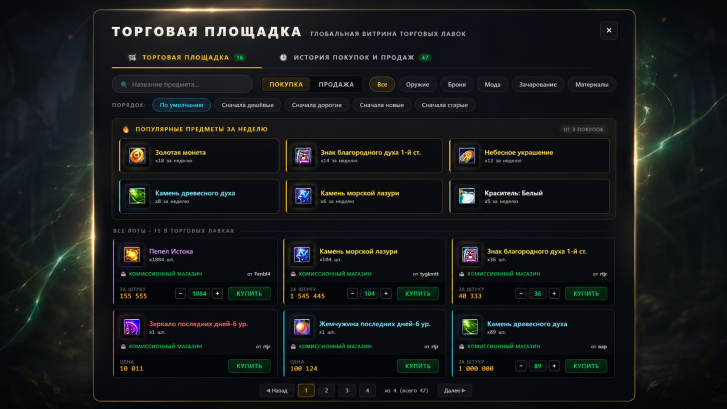

We have rebuilt trading between players. Every paid stall and every consignment shop on the server now sits in a single Marketplace window. It opens with Ctrl+T, with the button in the main game interface, or through «Consignment shop» at the Perfect World Consignor in the starting location.
A global shop window
One window shows the goods of every player stall (of those wearing a trade card) from all maps of the server, and all consignment shops at once. Before, you had to run around the zones and look into every stall separately; now the whole market is in front of you.
Search and filters
Search by item name from three characters, filters by category and three tabs: «Shop window», «My history» and «Popular this week». Finding the lot you need takes seconds.
Buying and selling without the running around
The «Buy» and «Sell» buttons work straight from the window, without walking up to the seller. You can buy the material you need from five stalls on different maps in one go, without leaving your city.
Item card and deal history
- A detailed card. Every lot shows the refine level, socketed gems, the maker’s name, the engraving and extra properties: as detailed as hovering over your own item in the inventory.
- My history. A separate tab keeps all your purchases and sales through the marketplace: date, price, seller or buyer. The «Purchase» and «Sale» filter helps you find the right deal quickly.
- Popular this week. The top items of the server over the last 7 days. Useful for reading prices and demand.
What changed under the hood
Consignment shops and player stalls used to live by their own rules; now they share one shop window. Buying and selling work across different locations of the server, protection against item substitution and anti-spam limits were added, and the old consignment window gave way to a full new interface.
We will be waiting for you at the open beta launch: that is where you can put the Marketplace to work.